Quick answer
RPG Map Editor's latest website update improves responsive navigation, refreshes the tile editor's top panel, fits starter maps to the canvas, and adds an original Tiny Swords-inspired 16×16 pack to Forest Ambush.
What shipped
Responsive public pages. The marketing shell, starter cards, asset page, and demo route now adapt to desktop, tablet, and phone widths.
A clearer editor header. The top panel shows the active project, map dimensions, tile size, and saved or unsaved state. Export actions are grouped so PNG and editable project downloads are easy to find.
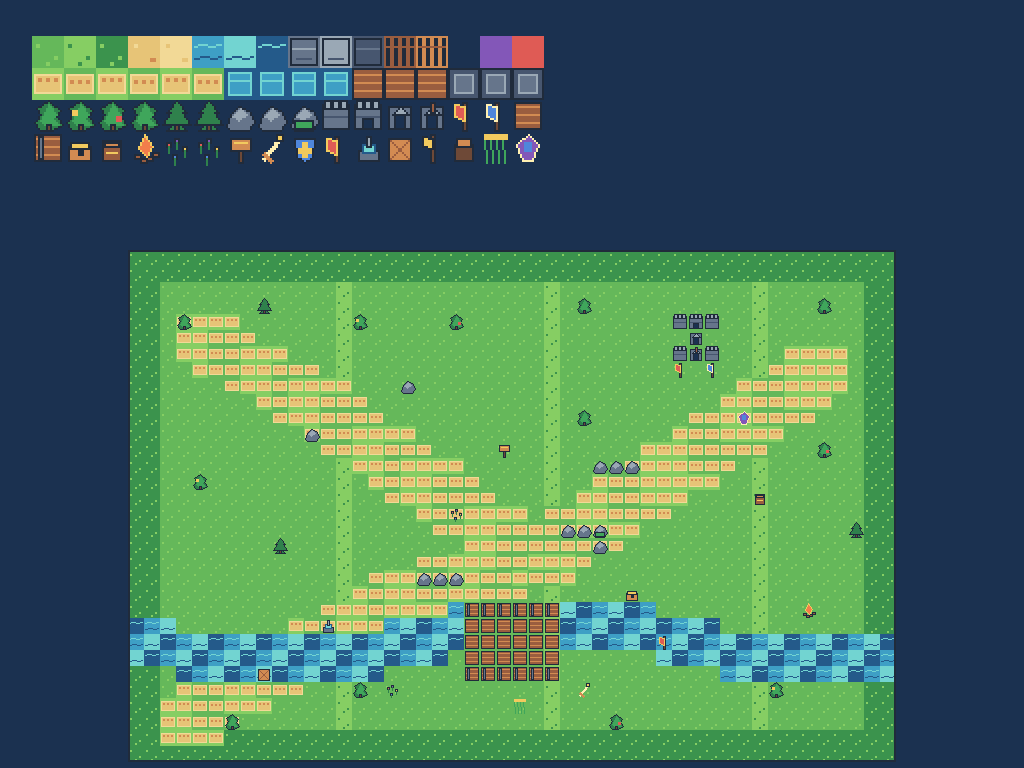
A brighter starter pack. Forest Ambush now uses original procedural pixel art with grass, sandy routes, water, bridges, castle walls, flags, trees, and encounter props.
Better first view. Opening an imported starter fits the map to the available canvas so the encounter reads immediately.
Try the update
Who is this for?
This update is for Dungeon Masters, tabletop creators, and indie developers who want a readable browser-first map workflow: choose a starter, edit the tiles, and export a PNG for play.
FAQ
Is the Tiny Swords pack an external download?
No. The browser editor serves the original bundled atlas with the demo project, so there is no separate setup step.
Is the public site mobile-friendly?
Yes. Public routes are designed to fit phone and tablet viewports. The full canvas still benefits from a larger screen when you are actively painting.
Do I need an account to try it?
No. You can open the browser editor and export a quick map first. Sign in when you want account-backed saves.
Frequently asked questions
What is the one-sentence RPG Map Editor update?
RPG Map Editor now has a more responsive public site, a clearer editor top panel, better starter-map fitting, and a new original Tiny Swords-inspired 16×16 Forest Ambush tileset.
Where can I try the new tileset?
Open the Forest Ambush demo at /demo/forest-ambush and use the bundled Tiny Swords Original Pack; it is included in the browser editor.
What can I export?
The editor can export a PNG for play and an editable project JSON or bundle for continued work.