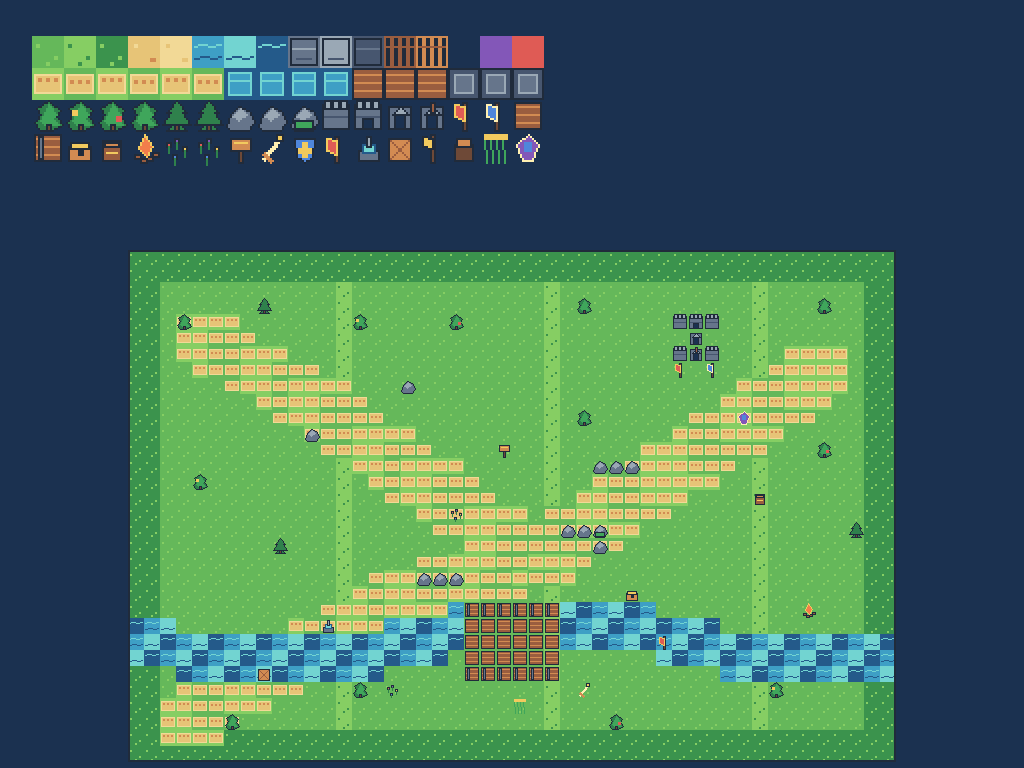
What is the RPG Map Editor website update?
The September 2026 RPG Map Editor website update makes the product easier to understand, faster to scan, and more useful when a DM needs a map quickly. The public pages now use a responsive workspace shell, the editor top panel shows the active map and save state, and the Forest Ambush starter uses a bright original Tiny Swords-inspired pixel-art pack.
The short version: open a starter, paint a readable encounter, and export a PNG without fighting the interface.
A cleaner path from landing page to map
The public navigation now keeps the primary choices close to the top: starter maps, pricing, support, and Login/Register. Internal implementation links stay out of the marketing rail, so a new visitor sees a clear next step instead of a list of unrelated tools.
The same layout adapts to narrow screens. Cards, navigation, screenshots, and calls to action fit the viewport without forcing horizontal page scrolling.
A sharper tile editor workspace
The editor top panel now gives the map a visible home. It shows the project name, map dimensions, tile size, and whether the current draft is saved. Tool buttons remain grouped by task, while export actions stay together in one menu for PNG, JSON, bundles, and engine handoff.
The editor also fits an imported starter map into the available canvas. That keeps the full encounter visible when you open a demo instead of making you hunt for the map with a zoomed-in view.
The Forest Ambush starter now uses Tiny Swords-inspired art
Forest Ambush is still a tactical route with a river and deliberate cover, but its art pack now has a brighter adventure-game palette:
- grass, sand paths, water edges, bridge planks, and stone terrain;
- castle walls, gates, pennants, flags, and a small keep;
- trees, rocks, flowers, crates, chests, barrels, campfires, and signposts;
- a crisp 16×16 atlas that stays sharp in the browser and in PNG exports.
The pack is original procedural artwork made for RPG Map Editor. It follows the cozy top-down fantasy direction of Tiny Swords while keeping the repository's asset provenance clear.
Open the Forest Ambush demo or start a new map.
How to use the update
- Open the starter maps page and choose Forest Ambush.
- Use the top-panel project menu to inspect the map size and bundled tileset.
- Paint terrain and props with the tool rail; use the river and castle pieces to create a readable route.
- Export a PNG for a VTT or download the editable project JSON for later changes.
What stays the same
You can still try the browser editor before creating an account. A free account is useful when you want cloud saves, while the editor's export-first workflow remains available for quick session prep.
The quick-answer companion lists the shipped changes in a compact format for readers who want the answer first.
Frequently asked questions
What changed in the RPG Map Editor website update?
The update improves responsive navigation and marketing pages, refreshes the editor top panel, and replaces the Forest Ambush demo art with an original Tiny Swords-inspired pixel-art pack containing grass, paths, water, castle pieces, flags, trees, and encounter props.
Can I use the new Tiny Swords-inspired pack without downloading anything?
Yes. Open the Forest Ambush demo in the browser, choose the bundled Tiny Swords Original Pack in the editor, and export a PNG or editable project when the map is ready.
Does the editor work on mobile?
The public pages and demo shell adapt to phone and tablet widths. The full map canvas is most comfortable on a desktop or tablet, while mobile remains useful for browsing starters and checking saved maps.