
Battle maps, not atlas maps
RPG Map Editor focuses on playable grid maps for encounters, rooms, roads, caves, and VTT scenes.
A scope-aware comparison for creators deciding between world-map cartography and browser-based DnD battle map creation.
Editor access requires an account and a paid plan: the Online subscription or the €14.99 one-time Offline Edition. Compare plans.
RPG Map Editor is a Wonderdraft alternative only when the job is playable encounter maps, dungeon rooms, or VTT battle maps. Wonderdraft-style tools are often better for world, regional, or atlas-scale cartography.
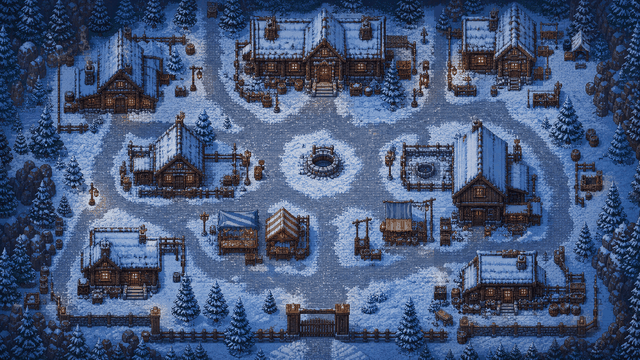
RPG Map Editor is independent and is not affiliated with or endorsed by Wonderdraft.
A campaign often needs both regional context and tactical encounters. This page separates those jobs honestly.
RPG Map Editor focuses on playable grid maps for encounters, rooms, roads, caves, and VTT scenes.
Use a web browser, save maps to your account, and export PNGs without a native desktop install.
Wonderdraft-style tools are often stronger for regional and world cartography. RPG Map Editor is narrower on purpose.
Open a demo, check the grid, then decide whether the editor fits your table prep loop.
Use it for taverns, caves, dungeon rooms, ruins, ambush roads, and battle maps players can stand on.
Use a dedicated cartography tool when your main output is a regional map, continent, atlas, or polished campaign handout.
A campaign can use a world map from one tool and tactical battle maps from another. Optimize around the map job.
The tools overlap less than the keywords suggest. Pick based on whether players need to stand on the map.
| Decision factor | RPG Map Editor | Other workflow |
|---|---|---|
| Map scale | Encounter, dungeon, and battle map scale | Regional, world, atlas, and decorative cartography scale |
| Install model | Browser-based editor workflow | Typically desktop-app style workflow; verify current platform support |
| Table output | Grid-aware PNGs for VTT upload or tabletop play | Campaign maps, handouts, and worldbuilding references |
The useful test is a map you would actually run: build it, export it, and align it in your VTT.
Open RPGMapEditor, choose a blank canvas or demo, paint broad terrain first, add props that clarify cover and movement, keep the tactical grid visible, save the editable project, then export a PNG for Roll20, Foundry VTT, print, or sharing. Walls, lights, doors, tokens, and platform automation are configured inside the VTT after import.
Build one encounter-scale map, export it, and validate the grid in the platform you actually use.
Use this page when that phrase matches your next map-making task or comparison step.
Use this page when that phrase matches your next map-making task or comparison step.
Use this page when that phrase matches your next map-making task or comparison step.
Use this page when that phrase matches your next map-making task or comparison step.
Use this page when that phrase matches your next map-making task or comparison step.
Use this page when that phrase matches your next map-making task or comparison step.
Only for some map jobs. Wonderdraft is commonly used for world and regional maps. RPG Map Editor focuses on browser-based encounter, dungeon, and battle map prep.
Choose RPG Map Editor when you need playable grid maps, terrain and prop placement, account saves, and PNG export for D&D sessions or VTT backgrounds.
Choose Wonderdraft or a similar desktop cartography tool when your main goal is polished world, continent, regional, or atlas-style maps rather than tactical encounter maps.
Yes. RPG Map Editor's shipped workflow runs in a desktop browser. No native desktop install is required for map editing and PNG export.
Open a real map, change it, export it, and decide from the result.