
Browser map creation
Open the editor in a desktop browser, start from a blank map or demo, and keep the source project available for later edits.
Create RPG, DnD, and battle maps online with terrain tools, stamps, grids, account saves, and PNG export for VTT or tabletop play.
Editor access requires an account and a paid plan: the Online subscription or the €14.99 one-time Offline Edition. Compare plans.
RPG Map Editor is an online RPG map editor for game masters who need playable maps, not generic fantasy wallpaper. Open the browser editor, create an encounter map, save it to your account, and export a PNG for Roll20, Foundry VTT, print, or campaign notes.
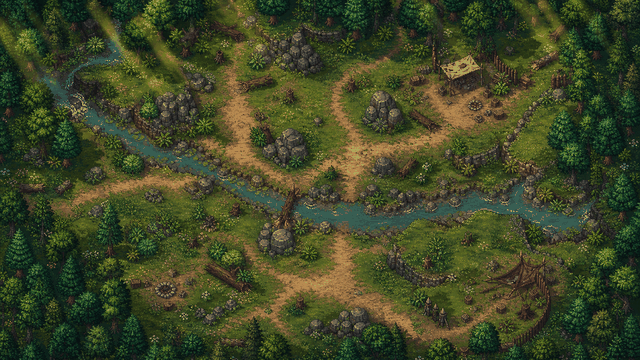
The product is intentionally focused on practical session prep: maps that can be reopened, revised, exported, and used at the table.
Open the editor in a desktop browser, start from a blank map or demo, and keep the source project available for later edits.
Block walkable space first, then add props, doors, cover, water, roads, dungeon rooms, and other details that affect play.
Plan around readable squares, token movement, line of sight, and encounter pacing instead of decorative detail alone.
Export a flat image for VTT upload, table handouts, projector play, or campaign notes; configure VTT automation inside the platform.
Open a demo, check the grid, then decide whether the editor fits your table prep loop.
Build rooms, roads, caves, taverns, ruins, ambush sites, and boss arenas with a clear five-foot grid.
Save editable maps to your account and revise them when the party takes a different route.
Export PNG scene art for Roll20, Foundry VTT, or another virtual tabletop, then align the platform grid.
Use the browser editor when you want a lighter prep loop than a desktop cartography suite.
Use this page to decide whether the browser editor fits your map job before comparing specific alternatives.
| Decision factor | RPG Map Editor | Other workflow |
|---|---|---|
| Primary job | Encounter-scale DnD, RPG, dungeon, and battle maps | Often broader illustration, worldbuilding, AI generation, or VTT automation |
| Workflow | Browser editor, account saves, terrain/stamps, grid checks, PNG export | Varies by product; may require desktop install, subscription library, or manual image editing |
| VTT handoff | Flat PNG export; walls, lights, fog, and tokens stay in the VTT | Some tools offer richer VTT packages; verify current support before switching |
The useful test is a map you would actually run: build it, export it, and align it in your VTT.
Open RPGMapEditor, choose a blank canvas or demo, paint broad terrain first, add props that clarify cover and movement, keep the tactical grid visible, save the editable project, then export a PNG for Roll20, Foundry VTT, print, or sharing. Walls, lights, doors, tokens, and platform automation are configured inside the VTT after import.
Build one encounter-scale map, export it, and validate the grid in the platform you actually use.
Use this page when that phrase matches your next map-making task or comparison step.
Use this page when that phrase matches your next map-making task or comparison step.
Use this page when that phrase matches your next map-making task or comparison step.
Use this page when that phrase matches your next map-making task or comparison step.
Use this page when that phrase matches your next map-making task or comparison step.
Use this page when that phrase matches your next map-making task or comparison step.
An RPG map editor is a tool for creating tabletop role-playing maps: battle maps, dungeon rooms, outdoor encounters, routes, and other playable spaces with terrain, props, grids, saves, and exportable images.
Yes. RPG Map Editor runs in a modern desktop browser, so you can open the editor, build maps, save projects to your account, and export PNG files without installing a native map-making app.
Yes. The product is built around D&D-style encounter prep: five-foot grid thinking, terrain readability, cover, props, and PNG export for VTT or tabletop use.
No. Editor access requires a paid subscription. See pricing for current plans.
Not one-to-one. RPG Map Editor focuses on browser-based encounter and battle map prep. Use the comparison pages to choose based on your actual map job, export needs, and preferred workflow.
Open a real map, change it, export it, and decide from the result.