
Visual battle maps
Use RPGMapEditor.com when a sketch is not enough and you want terrain color, props, stamps, text, grid, and PNG export.
Dungeon Scrawl is often a strong fit for fast sketch-style dungeon layouts. RPGMapEditor.com is the alternative when you want browser battle maps with saved projects, stamps, props, text, grid readability, and PNG export.
Compare them by output: a no-signup sketch workflow may be enough for planning, while a visual encounter map may work better for table play.
RPGMapEditor.com is a Dungeon Scrawl alternative when users need saved visual battle maps with stamps, props, text, grids, and PNG export rather than a sketch-first dungeon workflow.
Editor access requires an account and a paid plan: the Online subscription or the €14.99 one-time Offline Edition. Compare plans.
RPGMapEditor.com is independent and is not affiliated with or endorsed by Dungeon Scrawl.
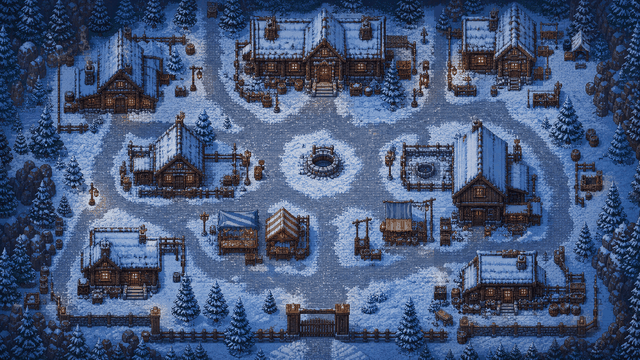
Use RPGMapEditor.com when the result needs to become an actual tabletop map: opened in the editor, edited around play, saved for later, exported as PNG, and reused when the campaign changes direction.
Use RPGMapEditor.com when a sketch is not enough and you want terrain color, props, stamps, text, grid, and PNG export.
Keep source maps in your account so you can revise the same dungeon room or encounter after the first draft.
Dungeon Scrawl can be better for fast no-signup dungeon outlines. RPGMapEditor.com is better when visual table output matters.
Export a PNG and align it in your virtual tabletop, or use it as a printable reference for in-person games.
Open the editor, make one focused encounter-scale map, save it, then export once to see whether the workflow fits your table.
The same six steps whether you are building a dungeon, a wilderness ambush, or a tavern brawl. The details change by map type; the workflow does not.
Pick columns, rows, and grid scale from the encounter footprint before decorating.
Block walkable ground, walls, roads, rooms, water, caves, or outdoor edges first.
Place cover, furniture, trees, rocks, doors, hazards, and landmarks only where they help play.
Keep movement readable and add labels only when they clarify the session.
Save the editable source map to return later. Editor access requires a paid subscription.
Export a PNG for Roll20, Foundry VTT, print, projection, or campaign notes.
Pick a map size, block out the terrain, and you will have a playable layout in minutes. Save or export it when the tactical read looks right.
Use this table to decide whether the current RPGMapEditor.com workflow matches the map job before investing more prep time.
| Factor | RPGMapEditor.com | Tradeoff |
|---|---|---|
| RPGMapEditor.com is better for | Fast browser battle maps, saved encounter sources, grid readability, and PNG export | Depends on competitor; may be better for world maps, marketplaces, or offline workflows |
| Competitors can be better for | Focused tactical encounters rather than broad cartography | World/region/city maps, polished illustration, larger asset ecosystems, or mature VTT packages |
| Fair test | Build one encounter, revise it once, save it, export PNG, and test VTT alignment | Run the same test and compare output, revision time, and real table fit |
RPGMapEditor.com is built for playable encounter maps. If the job below is not yours, a different tool will serve you better.
Sketch plan or visual battle map RPGMapEditor.com makes sense when the exported PNG is meant to be seen and played on, not just used as a planning outline.
Export a PNG, import it into your usual table or VTT setup, and check grid readability before a session depends on it.
The questions DMs usually ask before starting a map like this.
Yes, for some workflows. Dungeon Scrawl is a strong fit for quick online dungeon maps. RPGMapEditor.com is an alternative when you want a browser-based visual RPG map editor with terrain, stamps, grids, account-backed saved maps, and PNG export.
Dungeon Scrawl is often a strong choice for fast, clear, old-school dungeon layouts and shape-based sketching. If that is the exact output you need, it may be the more natural fit.
Yes, through PNG export. Upload the image to Roll20 or Foundry and align the VTT grid there. RPGMapEditor.com does not currently ship direct Roll20 upload, Foundry scene JSON, dynamic lighting, walls, or doors export.
Not one-to-one. Use Dungeon Scrawl if you mainly want fast dungeon sketches. Use RPGMapEditor.com if you want browser-based encounter-map prep with terrain painting, stamps, saved projects, and a visual editing workflow.
You can create dungeon and encounter layouts, but the product is not positioned as a pure old-school black-and-white dungeon sketcher. Check the current feature page and build one test map before switching a campaign workflow.
No. RPGMapEditor.com is independent and is not affiliated with, endorsed by, or sponsored by Dungeon Scrawl or Roll20.
It is best at fast browser-based battle maps for D&D and TTRPG sessions: terrain, props, grid, saved maps, and PNG export.
Competitors can be better for world maps, regional maps, illustration-heavy cartography, marketplaces, offline editing, or native VTT package exports.
Yes. The primary workflow is browser-based and aimed at session-ready battle map creation.
Paid subscribers can save source maps. See pricing for current plans and features.
Yes. PNG export is the current output for VTTs, print, projection, and notes.
No. RPGMapEditor.com creates the map image; Roll20, Foundry, or another VTT handles tokens, walls, lights, fog, and automation.
Build the same small encounter in each tool, revise it once, export it, and test grid alignment in the VTT you actually use.
No. Use RPGMapEditor.com for battle maps and encounter scenes, not large-scale world, region, or city cartography.
No for the browser workflow. Use a desktop app only if offline editing or local asset workflows matter more.
RPG Map Editor requires paid access. See pricing for current plan features.
Open the editor, build the encounter you were planning, save it, and export a PNG when it is ready for your table.