
Scene background export
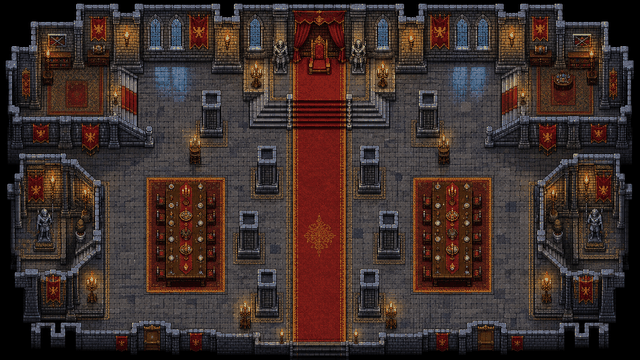
Create a visual encounter map and export a PNG that can become the Foundry scene background.
Create RPG battle maps in your browser, export PNG scene art, and set up grid-ready encounters inside Foundry VTT.
Editor access requires an account and a paid plan: the Online subscription or the €14.99 one-time Offline Edition. Compare plans.
Use RPG Map Editor to make the visual map for a Foundry scene. Export a PNG, create the scene in Foundry, set grid size and origin, then add walls, doors, lights, tokens, and automation in Foundry.
RPG Map Editor is independent and is not affiliated with or endorsed by Foundry VTT.
The shipped workflow creates visual map art and exports PNG. Foundry remains the place for walls, lights, doors, and tokens.
Create a visual encounter map and export a PNG that can become the Foundry scene background.
Choose square counts and export dimensions with Foundry grid configuration in mind.
Save the map in your account so you can revise art after playtest notes or campaign detours.
Open a demo, check the grid, then decide whether the editor fits your table prep loop.
Prepare rooms, roads, caves, ruins, or interiors as scene art, then add Foundry walls and lighting.
Export at known dimensions, then set Foundry's grid size and origin before inviting players.
Keep map footprint sized to the encounter instead of exporting oversized art for small fights.
RPG Map Editor builds the scene image. Foundry turns that image into an interactive tabletop scene.
| Decision factor | RPG Map Editor | Other workflow |
|---|---|---|
| Map creation | Creates the scene artwork in a browser and exports PNG | Foundry presents the scene and manages tabletop automation |
| Walls and lighting | Not exported as structured Foundry data today | Add walls, doors, lights, regions, and tokens inside Foundry |
| Best handoff | Clean PNG with known square count and dimensions | Foundry grid setup and player-view preview before the session |
The useful test is a map you would actually run: build it, export it, and align it in your VTT.
Open RPGMapEditor, choose a blank canvas or demo, paint broad terrain first, add props that clarify cover and movement, keep the tactical grid visible, save the editable project, then export a PNG for Roll20, Foundry VTT, print, or sharing. Walls, lights, doors, tokens, and platform automation are configured inside the VTT after import.
Build one encounter-scale map, export it, and validate the grid in the platform you actually use.
Use this page when that phrase matches your next map-making task or comparison step.
Use this page when that phrase matches your next map-making task or comparison step.
Use this page when that phrase matches your next map-making task or comparison step.
Use this page when that phrase matches your next map-making task or comparison step.
Use this page when that phrase matches your next map-making task or comparison step.
Use this page when that phrase matches your next map-making task or comparison step.
Yes. Build the visual map in RPG Map Editor, export a PNG, create a Foundry scene, set the grid, and add Foundry-specific walls, doors, lighting, and tokens inside Foundry.
Not today. The current shipped workflow is PNG scene background export, then Foundry-side setup for automation and lighting.
Use a predictable pixels-per-square export, create a scene with matching dimensions, set Foundry's grid size, then adjust grid offset until the artwork and platform grid agree.
No. RPG Map Editor is independent and is not affiliated with or endorsed by Foundry VTT.
Open a real map, change it, export it, and decide from the result.