Immediate browser start
Open the editor and make a map in a modern desktop browser without installing a separate app.
RPGMapEditor.com is a paid fantasy map maker when the map is a playable tabletop scene: dungeon rooms, ruins, taverns, forest roads, caves, bridges, and encounter locations.
It is not a full fantasy world map generator. Use it for battle maps and fantasy locations you can save, revise, and export as PNG for a VTT or table.
RPGMapEditor.com is a paid fantasy map maker for playable RPG scenes and battle maps. It is not a full fantasy world map generator.
Editor access requires an account and a paid plan: the Online subscription or the €14.99 one-time Offline Edition. Compare plans.
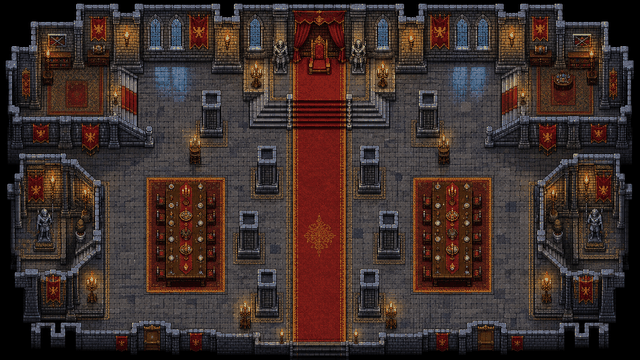
Use RPGMapEditor.com when the result needs to become an actual tabletop map: opened in the editor, edited around play, saved for later, exported as PNG, and reused when the campaign changes direction.
Open the editor and make a map in a modern desktop browser without installing a separate app.
Editor access requires an account and a paid subscription. See pricing for current plans.
Create battle maps, dungeon rooms, outdoor encounters, ruins, taverns, roads, and other playable tabletop scenes.
Export a flat PNG for Roll20, Foundry VTT, print, projection, or campaign notes after the map is readable.
Open the editor, make one focused encounter-scale map, save it, then export once to see whether the workflow fits your table.
The same six steps whether you are building a dungeon, a wilderness ambush, or a tavern brawl. The details change by map type; the workflow does not.
Pick columns, rows, and grid scale from the encounter footprint before decorating.
Block walkable ground, walls, roads, rooms, water, caves, or outdoor edges first.
Place cover, furniture, trees, rocks, doors, hazards, and landmarks only where they help play.
Keep movement readable and add labels only when they clarify the session.
Save the editable source map to return later. Editor access requires a paid subscription.
Export a PNG for Roll20, Foundry VTT, print, projection, or campaign notes.
Pick a map size, block out the terrain, and you will have a playable layout in minutes. Save or export it when the tactical read looks right.
Use this table to decide whether the current RPGMapEditor.com workflow matches the map job before investing more prep time.
| Factor | RPGMapEditor.com | Tradeoff |
|---|---|---|
| Best output | Encounter-scale battle maps with terrain, props, grid, saved source, and PNG export | World maps, illustrated cartography, or VTT automation may need another tool |
| Install model | Browser-based editor workflow | Some workflows require desktop apps, local asset packs, or VTT-specific setup |
| VTT handoff | PNG export for Roll20, Foundry VTT, print, projection, or notes | Structured walls, doors, lighting, tokens, or packages remain VTT-side unless a tool ships them |
RPGMapEditor.com is built for playable encounter maps. If the job below is not yours, a different tool will serve you better.
Fantasy scene output Build a playable fantasy scene, keep the saved source map, and export PNG for Roll20, Foundry VTT, print, projection, or notes.
Export a PNG, import it into your usual table or VTT setup, and check grid readability before a session depends on it.
The questions DMs usually ask before starting a map like this.
Playable encounter-scale fantasy scenes: outdoor camps and roads, ruins, tavern floors, forests, rivers, dungeon rooms, and similar tabletop layouts—with terrain painting, props, grids, and PNG export.
Encounter maps are sized for combat and exploration at the table or in a VTT with a clear grid. World or political atlas-style maps at continent scale are outside the product’s focus—use tools built for that cartography if that is your primary output.
Yes. Export PNG and configure grid alignment in Roll20 or Foundry. Very large canvases still need sensible pixels per square so tokens stay readable.
No. RPG Map Editor focuses on playable tabletop maps and encounter-scale fantasy scenes, not every form of world atlas, political map, or parchment-style regional cartography.
Use the battle map maker and D&D map maker pages for grid-first encounter language, then the Roll20 and Foundry export guides for import checklists.
No. Editor access requires a paid subscription. See pricing for current plans.
RPGMapEditor.com is a browser-based battle map maker for D&D and tabletop RPG sessions. It helps users paint terrain, place props, add grids and text, save maps, and export PNG images.
It is for Dungeon Masters, Game Masters, TTRPG players, Roll20 users, Foundry VTT users, and fantasy map creators who need encounter-scale battle maps.
Yes. The editor runs in a modern desktop browser with WebGL2, so the normal workflow does not require installing a desktop map app.
No. Editor access requires a paid subscription. See pricing for current plans.
Yes. PNG export is the current practical handoff for VTT upload, print, projection, and campaign notes.
Yes. Export a PNG, upload it to Roll20 as map-layer art, set page dimensions, and align Roll20's grid there.
Yes. Export a PNG and use it as a Foundry VTT scene background, then set grid size and origin in Foundry.
RPGMapEditor.com is better for encounter-scale battle maps. It is not positioned as a full world, region, or city cartography suite.
Paid subscribers can save source maps. See pricing for current plans and features.
Open the editor, choose a small map size, paint broad terrain, add only tactical props, check the grid, save, and export PNG.
Open the editor, build the encounter you were planning, save it, and export a PNG when it is ready for your table.