
Best for / Not best for
Best for: DMs and GMs who need a practical RPGMapEditor workflow for one map-making task: choose the right size, build the playable space, save the source project, and export a PNG for DnD, TTRPG, VTT, Roll20, Foundry VTT, print, or sharing.
Not best for: generic map theory, hidden keyword pages, fake popularity claims, or promises that RPG Map Editor exports Roll20 dynamic lighting, native Foundry scene JSON, walls, doors, tokens, or automation data.
Choose square count from encounter needs
Battle maps are usually planned by grid squares first, then pixels. A 20x20 map is tight and fast. A 30x30 map gives room for repositioning. Rectangles such as 40x30 work well for roads, bridges, ships, and halls.
Bigger is not automatically better. Large maps can slow uploads, hide details at normal zoom, and encourage players to spend turns crossing empty space.
- 15-22 squares: single rooms, taverns, alleys.
- 24-32 squares: flexible outdoor or dungeon fights.
- 35+ squares: set pieces, chases, and multi-phase arenas.
Pixels per square controls VTT sharpness
For VTT use, multiply columns by pixels per square to get image width, and rows by pixels per square to get image height. A 24x18 map at 70 pixels per square exports at 1680x1260 pixels.
Use enough resolution to look crisp at your table's normal zoom, but avoid huge files unless the encounter truly needs them.
- 70 px/square is a common lightweight target.
- 140 px/square can look sharper but increases file size.
- Always align the grid after import.
VTT, print, and projector maps have different priorities
A printed map must match physical scale. A VTT map must match the platform grid. A projector map must stay readable from across the room. Decide the output before you decorate.
- Print: proof a one-inch square first.
- VTT: match pixels per square and platform grid.
- Projector: prioritize contrast over tiny detail.
How to do it in RPGMapEditor
Open RPGMapEditor, start from a blank map or demo, paint the terrain that defines movement, place props only where they affect play, keep the grid readable, save the map when you need to return, then export a PNG for Roll20, Foundry VTT, print, or sharing.
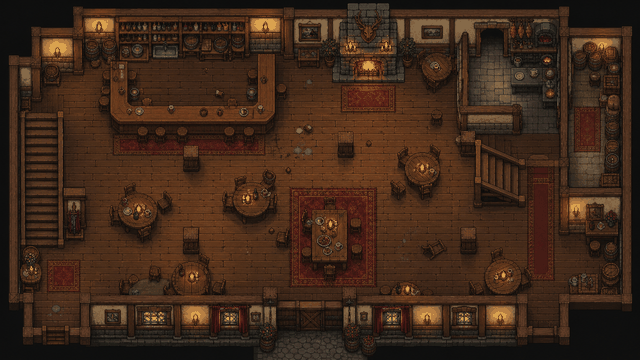
Use the screenshot or map example above as proof of the workflow: the article should show an actual editor-created map, not a stock fantasy image.
Use this article in the editor
Turn the guide into one map: pick a grid size, build the example, save it, and export once.