
Best for / Not best for
Best for: DMs and GMs who need a practical RPGMapEditor workflow for one map-making task: choose the right size, build the playable space, save the source project, and export a PNG for DnD, TTRPG, VTT, Roll20, Foundry VTT, print, or sharing.
Not best for: generic map theory, hidden keyword pages, fake popularity claims, or promises that RPG Map Editor exports Roll20 dynamic lighting, native Foundry scene JSON, walls, doors, tokens, or automation data.
Rooms and corridors should create decisions
A useful dungeon map is not just rooms connected by hallways. It gives players choices: risk a noisy door, take a longer route, fight through a chokepoint, or spend resources to scout.
Sketch the route graph before polishing art. If every path is linear, add a loop, secret bypass, balcony, collapsed passage, or vertical connection.
- Use loops to reduce hallway fatigue.
- Vary room shape to make fights feel different.
- Mark doors and thresholds clearly on the grid.
Chokepoints, cover, and sight lines matter most
Dungeon detail should support combat rulings. Rubble can be difficult terrain, pillars can block sight, pools can split movement, and furniture can create cover. Decoration that does not affect play should be quieter than tactical objects.
- Keep token spaces obvious.
- Avoid props that hide grid intersections.
- Use contrast for walls, hazards, and doors.
Design for fog-of-war or table reveal
If players explore room by room, export the whole dungeon for VTT fog tools or crop individual encounter rooms for lightweight reveals. Both workflows are valid; choose before you overbuild.
- Whole map: better for exploration flow.
- Room crops: easier for low-bandwidth sessions.
- Keep labels out of player-facing exports.
How to do it in RPGMapEditor
Open RPGMapEditor, start from a blank map or demo, paint the terrain that defines movement, place props only where they affect play, keep the grid readable, save the map when you need to return, then export a PNG for Roll20, Foundry VTT, print, or sharing.
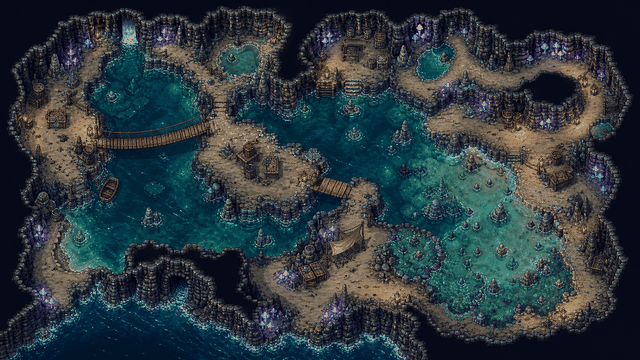
Use the screenshot or map example above as proof of the workflow: the article should show an actual editor-created map, not a stock fantasy image.
Use this article in the editor
Turn the guide into one map: pick a grid size, build the example, save it, and export once.