
Best for / Not best for
Best for: DMs and GMs who need a practical RPGMapEditor workflow for one map-making task: choose the right size, build the playable space, save the source project, and export a PNG for DnD, TTRPG, VTT, Roll20, Foundry VTT, print, or sharing.
Not best for: generic map theory, hidden keyword pages, fake popularity claims, or promises that RPG Map Editor exports Roll20 dynamic lighting, native Foundry scene JSON, walls, doors, tokens, or automation data.
Write the encounter before drawing the art
Start with the situation: who enters from where, what blocks sight, what becomes cover, and what happens if players avoid the obvious route. A battle map is easier to finish when it answers those table questions before it becomes decorative.
For a first D&D battle map, choose one clear objective and one terrain complication. A bridge over water, a road through trees, or a ruined room with two doors gives players enough choices without turning prep into a full cartography project.
- Pick a square count that matches the fight length.
- Mark safe movement lanes before adding props.
- Reserve visual contrast for walls, hazards, doors, and cover.
Terrain, paths, props, then grid
Paint broad terrain first: floor, grass, stone, cave, water, or road. Then add paths and blockers. Props should support the encounter: tables for cover, trees for sight lines, rubble for chokepoints, doors for reveal pacing.
Keep the grid visible while you work. If the art looks good but the grid makes movement ambiguous, simplify the art until the tactical read wins.
- Terrain pass: readable ground and boundaries.
- Prop pass: only objects that clarify play or story.
- Grid pass: check door widths, range lanes, and token space.
Validate in your actual VTT
Export a PNG, import it into your virtual tabletop, and align the platform grid before session day. Roll20, Foundry VTT, projectors, and print workflows all have slightly different scale expectations.
Save the editable RPG Map Editor project so you can revise doors, props, or terrain after players change direction.
- Record pixels per square with the exported file.
- Do one zoomed-out readability check.
- Keep the source project for later edits.
How to do it in RPGMapEditor
Open RPGMapEditor, start from a blank map or demo, paint the terrain that defines movement, place props only where they affect play, keep the grid readable, save the map when you need to return, then export a PNG for Roll20, Foundry VTT, print, or sharing.
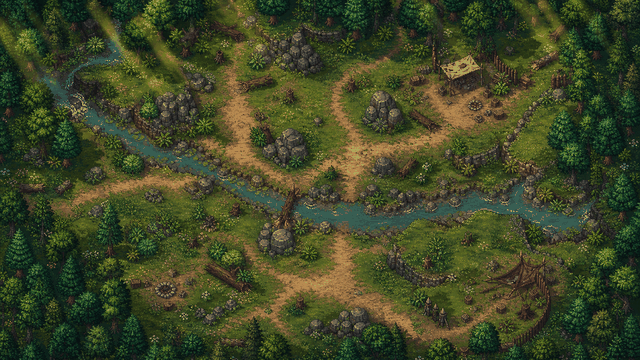
Use the screenshot or map example above as proof of the workflow: the article should show an actual editor-created map, not a stock fantasy image.
Use this article in the editor
Turn the guide into one map: pick a grid size, build the example, save it, and export once.