
D&D encounter maps
Build five-foot-grid battle maps for taverns, caves, forests, ruins, dungeons, alleys, bridges, and boss rooms.
RPGMapEditor.com is a D&D battle map maker for encounter-scale maps that need terrain, props, tactical grids, saved source maps, and PNG export.
Use it for the map your players need this week: choose square count, paint the space, add the props that matter, save the source, export PNG, and align the result in your VTT or print workflow.
RPGMapEditor.com is a browser-based D&D battle map maker for encounter-scale maps with terrain, props, tactical grids, saved source maps, and PNG export.
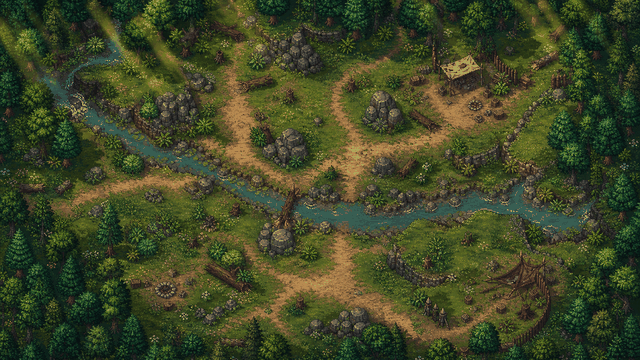
Use RPGMapEditor.com when the result needs to become an actual tabletop map: opened in the editor, edited around play, saved for later, exported as PNG, and reused when the campaign changes direction.
Build five-foot-grid battle maps for taverns, caves, forests, ruins, dungeons, alleys, bridges, and boss rooms.
Start with the browser editor and the Free plan: core tools, PNG export, forum access, and up to three saved maps.
Use terrain brushes, stamps, props, grid settings, and labels to make a map players can read quickly.
Download a flat PNG for a virtual tabletop, projector, print reference, or campaign notes after checking grid scale.
Open the editor, make a focused encounter-scale map, save the source, then export once to see whether the workflow fits.
This is the same practical sequence for core pages, comparison pages, VTT workflows, and template-style pages. The details change by map type, but the activation path stays measurable.
Pick columns, rows, and grid scale from the encounter footprint before decorating.
Block walkable ground, walls, roads, rooms, water, caves, or outdoor edges first.
Place cover, furniture, trees, rocks, doors, hazards, and landmarks only where they help play.
Keep movement readable and add labels only when they clarify the session.
Save the editable source map to return later. Free accounts can save up to 3 maps.
Export a PNG for Roll20, Foundry VTT, print, projection, or campaign notes.
Move from research to a concrete map. A saved or exported map is the useful validation point.
Use this table to decide whether the current RPGMapEditor.com workflow matches the map job before investing more prep time.
| Factor | RPGMapEditor.com | Tradeoff |
|---|---|---|
| Best output | Encounter-scale battle maps with terrain, props, grid, saved source, and PNG export | World maps, illustrated cartography, or VTT automation may need another tool |
| Install model | Browser-based editor workflow | Some workflows require desktop apps, local asset packs, or VTT-specific setup |
| VTT handoff | PNG export for Roll20, Foundry VTT, print, projection, or notes | Structured walls, doors, lighting, tokens, or packages remain VTT-side unless a tool ships them |
The goal is trust, not overclaiming. Use RPGMapEditor.com when the current browser and PNG workflow matches the job; choose another workflow when it does not.
D&D battle map PNG workflow Create the visual battle map in RPGMapEditor.com, then let Roll20, Foundry VTT, print, or your tabletop handle final presentation.
Export one PNG, import it into your actual table workflow, and check grid readability before a session depends on it.
Use this next when it matches your map type, export platform, comparison question, or pricing decision.
Use this next when it matches your map type, export platform, comparison question, or pricing decision.
Use this next when it matches your map type, export platform, comparison question, or pricing decision.
Use this next when it matches your map type, export platform, comparison question, or pricing decision.
Use this next when it matches your map type, export platform, comparison question, or pricing decision.
Use this next when it matches your map type, export platform, comparison question, or pricing decision.
Use this next when it matches your map type, export platform, comparison question, or pricing decision.
Use this next when it matches your map type, export platform, comparison question, or pricing decision.
These are the natural next questions a DM, VTT user, or comparison shopper usually needs answered before opening the editor.
RPGMapEditor.com is a browser-based battle map maker for D&D and tabletop RPG sessions. It helps users paint terrain, place props, add grids and text, save maps, and export PNG images.
It is for Dungeon Masters, Game Masters, TTRPG players, Roll20 users, Foundry VTT users, and fantasy map creators who need encounter-scale battle maps.
Yes. The editor runs in a modern desktop browser with WebGL2, so the normal workflow does not require installing a desktop map app.
Yes. Free accounts can use core editor tools, export PNG, access the forum, and save up to 3 maps.
Yes. PNG export is the current practical handoff for VTT upload, print, projection, and campaign notes.
Yes. Export a PNG, upload it to Roll20 as map-layer art, set page dimensions, and align Roll20's grid there.
Yes. Export a PNG and use it as a Foundry VTT scene background, then set grid size and origin in Foundry.
RPGMapEditor.com is better for encounter-scale battle maps. It is not positioned as a full world, region, or city cartography suite.
Yes. Signed-in users can save editable source maps and return later; Free accounts can save up to 3 maps.
Open the editor, choose a small map size, paint broad terrain, add only tactical props, check the grid, save, and export PNG.
Yes. RPG Map Editor runs in a desktop browser so you can create encounter-scale maps with terrain, props, grids, saved projects, and PNG export for your table or VTT.
Yes. Export a PNG for a virtual tabletop, print reference, or session handout, then keep the editable project saved for later revisions.
Yes. The workflow is built around DM and GM prep: quick encounter layouts, readable tactical space, and export-focused handoff before game night.
Start small for one-shots and skirmishes. A 20x20 or 30x20 square canvas is often enough for a focused room, road, ruin, or forest encounter.
Turn this search into a measurable product action: open the editor, create the map, save it, export PNG, and return when the session changes.